When eLearning Teams Reinvent the Wheel – Why Proven Processes Win

The team is three weeks into a course build when someone suggests a new way to handle reviews, someone else wants a different storyboard format, and a third person starts building screens before the script is final, "to save time." Each idea sounds reasonable on its own, but together they quietly destroy the schedule. If your team keeps rebuilding its eLearning development process in the middle of projects, you're not alone, and there's a better way. So why do eLearning teams keep reinventing the wheel, and what should they do instead?
eLearning teams reinvent the wheel because change feels like progress and proven processes can feel slow or boring, but experimenting mid-project usually costs more time than it saves. A proven eLearning development process exists because earlier teams already paid for the lessons in it: finish and check the script and storyboard before production, let each specialist own their part, and review in a fixed order. Improve your process between projects, not during them, by testing new ideas on a small pilot, keeping what works and documenting it. That approach gives you steady improvement without gambling the current deadline.
Why Do Teams Abandon Proven Processes?
Teams abandon proven processes for understandable reasons. A new team member brings habits from another company. A stakeholder wants things "more agile." Someone reads about a new technique and wants to try it right away. Or the process feels heavy, and skipping a step looks like an easy way to get ahead.
Consistency is also difficult. Following a process takes discipline, especially when the steps feel repetitive, while doing something new feels creative and energizing. But a course project is a poor place to learn whether a new idea works, because the cost of a failed experiment lands on the schedule, the budget and the people responsible for fixing it.
None of this means processes should never change. They should. The question is when and how.
A Familiar Missed-Deadline Story
Picture a team with a solid process and a tight but realistic schedule. Midway through, they decide to save time by starting development while the script is still in review, so the developer builds screens and the voice talent records narration from a draft.
Then the subject matter expert (SME) review comes back with incorrect terms, a few steps out of order and one section that needs to be rewritten. Now the narration has to be re-recorded, the screens rebuilt and the timing redone. The "time saved" by starting early turns into a week or two of rework, and the launch date slips. Anyone who has worked in eLearning for a while has seen some version of this.
The mistake wasn't working fast. It was skipping the step that protects everything after it.
Signs Your Team Is Reinventing the Wheel
It's not always obvious from the inside. These signs usually mean the process is being rebuilt on the fly:
- Each project uses a different storyboard template or review method.
- Development starts while the script is still "almost final."
- Nobody can point to a written version of the team's process.
- The same problems show up in every retrospective, if there is one.
- New team members learn the process by watching, and each learns a different version.
Two or more of these is a strong hint that the team needs to agree on one process and stick to it for a few projects before changing anything else.
Why Do Mid-Project Changes Cost So Much?
At Instructional Engineer, we call this the propagation of error. An error in the script doesn't stay in the script, because it gets copied into narration, graphics, on-screen text, captions, the build and the test plan, and the later you find it, the more layers you have to correct.
That's the core reason a good eLearning development process places so much emphasis on the early steps. Correcting a word in a script takes minutes, while correcting the same word after it's been recorded, animated and published can take a day.
What Does a Proven eLearning Development Process Look Like?
A proven eLearning development process moves in a clear order, with a check at the end of each step. Most established models, including ADDIE (Analysis, Design, Development, Implementation, Evaluation), follow the same basic logic. Here's a simple version that works for most corporate courses:
- Analyze. Confirm the problem, the audience and what learners must do after training.
- Design. Write objectives, an outline and the assessment approach. Get sign-off.
- Script. Write narration and on-screen text. Run a full QA (quality assurance) pass on the script itself: terms, steps, numbers and pronunciation notes.
- Storyboard. Describe every screen, interaction and piece of feedback. QA it too.
- Approve. Get the SME and decision-maker to lock the script and storyboard.
- Produce. Record audio, create graphics and build the course from the approved storyboard.
- Test. Run alpha and beta reviews and full QA in the real learning management system (LMS).
- Launch and learn. Release, watch for issues and hold a short retrospective.
Steps three through five carry the most weight. Finishing QA on the audio script and storyboard before development starts is the single habit that prevents the most rework.
Let Specialists Own Their Roles
A proven process also depends on people doing the jobs they're best at. When roles blur, decisions get made by whoever happens to be holding the file: the developer rewrites content to fit a screen, the designer specifies interactions the tool can't build, or a stakeholder edits narration directly in the script without telling anyone.
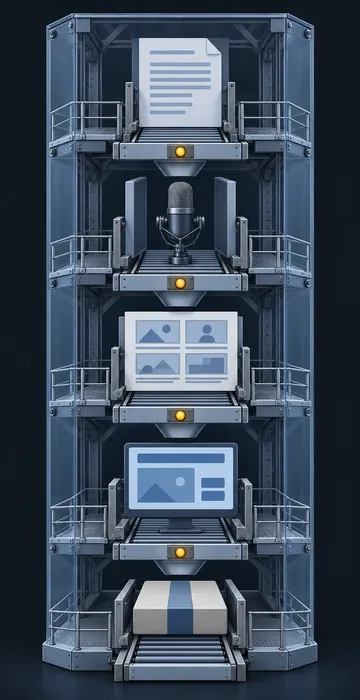
Let each specialist own their part: the instructional designer owns content and structure, the developer owns the build, the media specialist owns graphics and audio, the SME owns accuracy, and the project manager owns the schedule and the process. Owners can and should collaborate. But when a question comes up, everyone should know who makes the call.
How Should Teams Improve Their Process?
Teams should improve their process between projects, using real evidence from finished work. That keeps the current project stable and still lets the process get better over time.
- Hold a short retrospective at the end of every project. What slipped, and why?
- Pick one or two changes to try next time, not ten.
- Test new ideas on a small or low-risk project first.
- Write down what works in a shared process document.
- Retire steps that no longer add value, on purpose and with the team's agreement.
This is how a process stays both proven and current. It changes, but deliberately and in daylight, not in the middle of a deadline.
A Quick Checklist Before Development Starts
Before anyone records audio or builds a screen, run through this checklist:
- Objectives approved in writing.
- Script finished and checked for terms, numbers, steps and pronunciation.
- Storyboard finished, with every interaction and piece of feedback written out.
- SME and decision-maker sign-off on both script and storyboard.
- Every approver identified, including legal or compliance if needed.
- Roles and owners confirmed for each part of the build.
- Change request process agreed for anything after the lock.
If any box is unchecked, development isn't ready to start. Starting anyway is how the wheel gets reinvented, one shortcut at a time.
What If Your Project Is Already Off Track?
If your project is already slipping because of mid-project changes, don't add another experiment to fix it. Go back to the basics: freeze new process changes, lock what's approved, list what's left and re-plan with honest dates. Our guide to eLearning project rescue walks through the warning signs and the steps to get a struggling course back on schedule.
A Proven eLearning Development Process Is the Fastest Way to Ship
Teams reinvent the wheel because new ideas feel exciting and established processes feel slow. But a proven eLearning development process is fast where it counts, because it catches errors when they're inexpensive, lets specialists do their best work and keeps the schedule honest.
Before your next project starts, write down your process in one page, add the pre-development checklist above and agree as a team to save new experiments for the retrospective. You'll ship more courses on time and spend a lot less time fixing problems you could have caught in the script.