How Is Augmented Reality Used in Training?
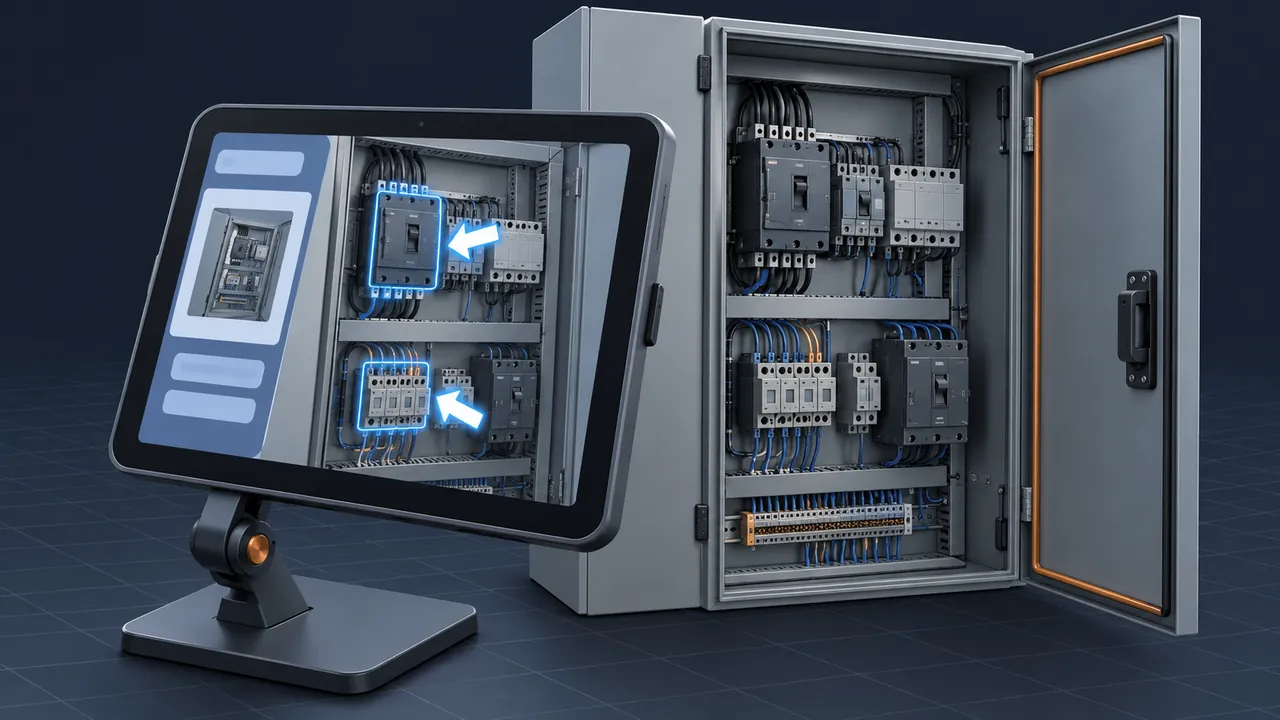
A technician kneels in front of a control cabinet they've never opened before. The manual is a 200-page PDF on a tablet, and somewhere in it is the step they need, while somewhere in the cabinet is the terminal it refers to. Matching the two takes time, and guessing introduces risk. What if the instructions could appear right on the cabinet itself? How is augmented reality used in training, and where does it pay off?
Augmented reality training places digital information, such as arrows, labels, 3D models and step-by-step instructions, on top of the real world through a phone, tablet, smart glasses or headset, so learners get guidance exactly where they're working. The most common uses are guided procedures on real equipment, showing hidden parts inside machines, remote expert support, site orientation and safety awareness. AR shines when people must learn on the actual equipment rather than in a classroom or a fully virtual space. It works best for hands-on technical tasks and tends to blur the line between training and on-the-job support.
What Makes AR Different From VR?
Virtual reality (VR) replaces your surroundings, while augmented reality (AR) adds to them. In a VR headset, you stand in a virtual plant. With augmented reality, you stand in the real plant, and a glowing outline shows you which valve to close next.
That difference shapes everything about how each technology is used. VR is a rehearsal space, separate from the job, whereas AR operates on the job, in front of the real equipment. The Wikipedia overview of augmented reality covers the technology's history and the range of devices, from handheld screens to head-mounted displays.
The Main Ways Augmented Reality Training Is Used
Most augmented reality training falls into five patterns, and while some programs use just one, others combine several.
Guided Procedures on Real Equipment
This is the most common application. The learner points a device at the equipment, and the steps appear in position: open this panel, check this reading, turn this handle a quarter turn. Each step highlights the exact component involved. New technicians receive support the first time they perform a real task, and experienced technicians get a reminder for rarely performed jobs.
Seeing Inside the Machine
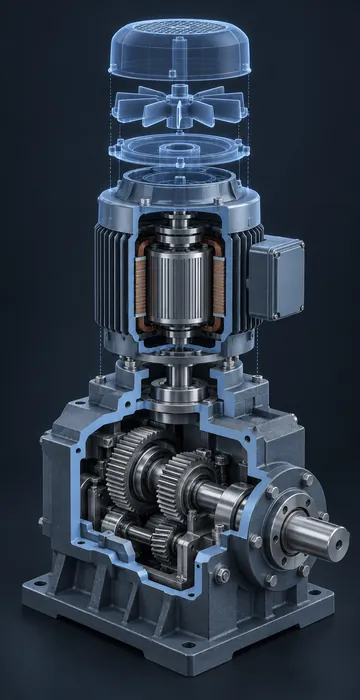
AR can show a 3D model of a machine's internals lined up with the real housing. Learners see the gears behind the cover or the pipe route inside the wall without disassembling anything. This builds the same mental picture a cutaway diagram does, but in the correct location and at the actual scale.
Remote Expert Support
A less experienced worker shares their camera view with an expert at another location. The expert draws arrows and circles that stay pinned to the real equipment on the worker's screen. It's part coaching and part support, and it distributes expertise across sites without travel.
Site Orientation and Wayfinding
New hires walk a facility and see markers for emergency exits, eyewash stations, restricted areas and key equipment. It converts a long guided walking tour into a self-guided experience they can repeat whenever necessary.
Safety Awareness
AR can show hazards that are otherwise invisible: swing radius around equipment, safe approach distances or the path a release would take. Seeing a boundary drawn on the actual floor tends to be more memorable than reading about it.
What Devices Does AR Training Use?
The device shapes the experience more than most teams anticipate, so here's how the main options compare.
| Device | Strengths | Trade-offs |
|---|---|---|
| Phone or tablet | Cheap, familiar, already in many workers' pockets | Ties up at least one hand; small view |
| Smart glasses | Hands-free; good for simple prompts and remote support | Small display; limited 3D |
| AR or mixed reality headset | Full 3D overlays anchored to the real world, hands-free | Costly, heavier, may clash with hard hats and safety glasses |
| Projection | Shows guidance directly on a work surface; nothing to wear | Fixed to one workstation |
Start with tablets unless you have a clear reason not to, because they're inexpensive, easy to manage and adequate for most guided procedures. Move to hands-free devices when the task truly needs both hands, and test them with the personal protective equipment (PPE) your workers actually wear.
Is AR Training or Performance Support?
Often it's both, and that's one of its strengths. Traditional training happens before the job, while performance support helps during the job. AR blurs the distinction, because the same overlay that teaches a new hire also reminds a veteran.
A practical way to design for this is to build two modes. In learning mode, every step is highlighted with an explanation of why it matters, while in support mode the overlay is minimal, showing just the next step and a check. As people gain skill, they switch modes and the guidance fades into the background. That fading is important; you want competent workers, not workers who can't function without a screen.
What Are the Challenges With AR Training?
The technology is impressive, but real workplaces are demanding environments for it, so plan for these challenges early:
- Tracking problems. Shiny surfaces, low light and repetitive patterns can confuse the device, causing overlays to drift.
- Equipment variation. If units differ between sites, the overlays must match each version.
- Content creation. Every procedure needs 3D models, anchors and steps. Without existing CAD data, this takes a lot of effort.
- Connectivity. Remote support needs a solid connection, which many sites don't have.
- Updates. When a procedure changes, the overlay must change too, or it will guide people the wrong way.
- Hazardous locations. Areas classified for flammable gas, vapor or dust need devices certified for that location, such as intrinsically safe tablets, which narrows your choices and raises the cost per device.
Content is usually the largest expense, although the 3D assets you build for AR can often be reused elsewhere, which is why many teams plan AR alongside 3D animation for training. The same models that animate a procedure in a course can anchor it on the real equipment.
How Do You Plan an Augmented Reality Training Pilot?
Keep the first project small, physical and measurable. The goal is to learn what AR does in your environment, with your equipment and your people, before anyone signs a large contract.
- Pick one procedure that's done rarely, has many steps and causes errors or callbacks when it goes wrong.
- Walk the procedure with an experienced technician and record every step, every part touched and every place people hesitate.
- Gather what 3D data you have. CAD files, existing models or even good photos will shape how much modeling you need.
- Build the overlay for tablets first, with clear highlights and short text for each step.
- Test on the real equipment, in real lighting, with workers wearing their normal PPE.
- Compare first-time accuracy and task time against workers using the usual manual.
Pay close attention to step five, because AR that works perfectly at a desk in the office can struggle beside a dusty machine under flickering lights. You want to discover those problems in week two, not after rollout. Ask testers what interfered with the task, not just whether they liked it. Their answers will tell you whether to scale up, change devices or stick with simpler job aids.
Instructions That Live Where the Work Happens
Strip away the hardware and augmented reality training comes down to one idea: put guidance exactly where it's needed, on the equipment, in the moment, in the real environment. It guides procedures, reveals hidden components, connects workers with experts and makes facilities easier to learn.
The most effective AR programs don't try to cover everything. Instead, they target the moments when a worker is standing in front of real equipment, unsure of the next step, with no expert nearby. Identify those moments in your own operation, list them, and you'll have a clear map of where augmented reality training can pay off first.