Using AI to Personalize Employee Onboarding
Two people start on the same Monday. One has ten years of experience in your industry and has used your main software at three other companies. The other is fresh out of school and has never worked in an office. Both get the same 12-hour onboarding path. One is bored by lunch. The other is overwhelmed by Wednesday. Thoughtful AI onboarding can fix that mismatch without asking your team to hand-build a different program for every new hire. How can you use AI to personalize employee onboarding in a way that helps people and stays manageable for your team?
Use AI to personalize onboarding by tailoring each new hire's learning path to their role, location and experience, answering their questions at any hour from approved content, and giving managers short, timely progress summaries. Keep a fixed core of required topics, like compliance and safety, that everyone completes. Around that core, AI helps you recommend which optional modules each person needs based on a short intake or skills check, generate role-specific examples and practice, and send nudges at the moments people need them. HR and L&D still set the rules, approve the content and review what the system recommends. The new hire gets a path that fits, and your team keeps control.
What Does Personalized Onboarding Actually Mean?
Personalized onboarding means everyone covers what they must, and nobody wastes time on what they already know. It's not a completely custom program for each person. That would be impossible to maintain and hard to audit.
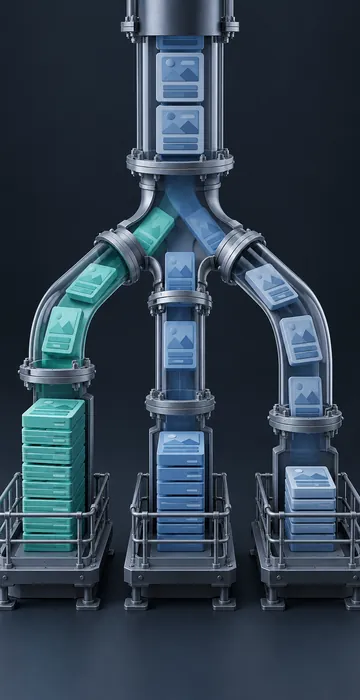
A helpful way to picture it is a core and a set of branches. The core holds required content: policies, compliance topics, safety and the basics of your culture. The branches hold role skills, systems training and background knowledge, and each new hire follows only the branches they need. AI makes the branching practical, because it can help sort people into the right branches and generate small variations without your team writing every version by hand.
Five Ways AI Onboarding Personalizes the Experience
1. Tailored learning paths
A short intake survey or skills check in the first days tells you what each person already knows. An AI tool can read those responses alongside the job description and recommend which optional modules to assign or skip. Someone who already uses your CRM daily skips the basics and goes straight to your company's specific setup. A coordinator reviews the recommendations before they're assigned, at least until you trust the pattern.
2. A question assistant that's always awake
New hires have dozens of small questions they feel silly asking. Where do I submit mileage? What's the dress code for client visits? An assistant that answers only from your approved handbook, policies and onboarding materials gives them quick answers at any hour, and it points to the source document. Questions it can't answer go to a real person, and those gaps tell you what your materials are missing.
3. Role-specific examples and practice
Generic examples are easy to ignore. AI can quickly rewrite a scenario so a warehouse new hire sees a forklift situation while an office hire sees a customer email, both teaching the same principle. Your team approves the variations once, and they're reused for every future hire in that role.
4. Nudges at the right moment
Instead of a wall of tasks on day one, AI tools can help schedule short reminders and content tied to milestones: a module on expense reports the week before the first business trip, or a refresher on the ticketing system after the first week of real use.
5. Manager summaries
Managers are busy, and onboarding slips when they lose track. A brief weekly summary of what a new hire has finished, what they've asked about and where they seem stuck gives managers exactly what they need for a useful check-in.
How Much Time Can Personalization Save?
It depends on your roles, but the savings can be significant for experienced hires and transfers. The chart below shows an illustrative example: four hypothetical new hires who would all take the same standard path, compared with personalized paths based on what each one already knows.
Four hypothetical new hires, required plus optional modules
- Standard path
- Personalized path
Illustrative example: a 12-hour standard path with a 4-hour required core; personalized hours are assumptions, not research findings.
View the data
| Standard path | Personalized path | |
|---|---|---|
| Experienced hire | 12 hrs | 6 hrs |
| Internal transfer | 12 hrs | 4 hrs |
| Career changer | 12 hrs | 10 hrs |
| New graduate | 12 hrs | 14 hrs |
Personalization doesn't always mean less training. The new graduate in this example gets more support, not less. That's the point: time moves to where it helps.
What Data Should AI Onboarding Use, and What Should It Avoid?
Use only the data you need to tailor learning: role, location, team, start date, a self-assessment and skills check results. Avoid sensitive personal information entirely. Health details, family situations and anything related to protected characteristics have no place in a learning recommendation.
Be open with new hires. Tell them what the system uses, what it recommends and that a person reviews it. Use only tools your organization has approved for employee data. Frameworks such as the NIST AI Risk Management Framework offer a useful structure for thinking through these questions with HR, legal and IT. Public agencies usually have additional rules about records, privacy and approved tools, and our article on AI in government training covers how those teams adopt AI responsibly.
Simple rule of thumb: if you'd feel awkward explaining to a new hire why the system made a recommendation, don't use that data.
How to Pilot AI Onboarding Without Overhauling Everything
Start with one role that hires often and has a clear onboarding path. Then follow these steps:
- Split the current path into the required core and optional branches.
- Write a short intake survey or skills check for that role.
- Set up an assistant that answers only from approved onboarding documents.
- Have a coordinator review AI recommendations for every pilot hire.
- Ask pilot hires and their managers for feedback at 30 and 60 days.
- Compare time to first independent task and new hire satisfaction with recent hires who took the standard path.
Keep the pilot small and the review step strong. You're learning what works for your organization, and early adjustments are much easier with a handful of people than with a whole hiring class.
What Should Stay Human in Onboarding?
The moments that make someone feel they belong should always stay human. A manager's welcome on the first morning, lunch with the team, a buddy who shows them where everything is and an honest 30-day conversation about how it's going can't be automated, and nobody should try.
The same goes for the hard parts. If a new hire is struggling, the AI summary might flag it, but the conversation about it belongs to the manager. Think of personalization as the thing that clears space for those human moments. When people aren't wading through modules they don't need, they have more time and energy for the relationships that keep them in the job.
Will New Hires Trust an AI Assistant?
They tend to, when it's useful, honest about its limits and backed by real people. Trust breaks when an assistant guesses at answers or when new hires feel watched instead of helped. Make it easy to reach a person, show the source for every answer and never use the assistant's chat history to judge performance. Treat it as a friendly helper, and new hires will treat it the same way.
AI Onboarding That Fits Each Person
AI onboarding personalizes the first weeks by matching the path to the person: skipping what they know, adding support where they need it and answering questions at any hour. A required core keeps everyone compliant, and human review keeps the recommendations fair.
Choose one role, split its path into core and branches, and run a small pilot. Your next round of new hires will feel the difference on their very first Monday.